RAG Eval Harness
Check with the same question sheet whether an AI help desk update made its answers worse
Put questions and expected answers in a CSV, and have the help desk answer them the same way before and after an update. Questions that got worse since the last run come first in a Japanese report. It is a Node.js program that runs on your own machine, so there is no live demo on this page. The screens below are the report from the sample (npm run demo:diff) you can open after purchase, before entering an API key.
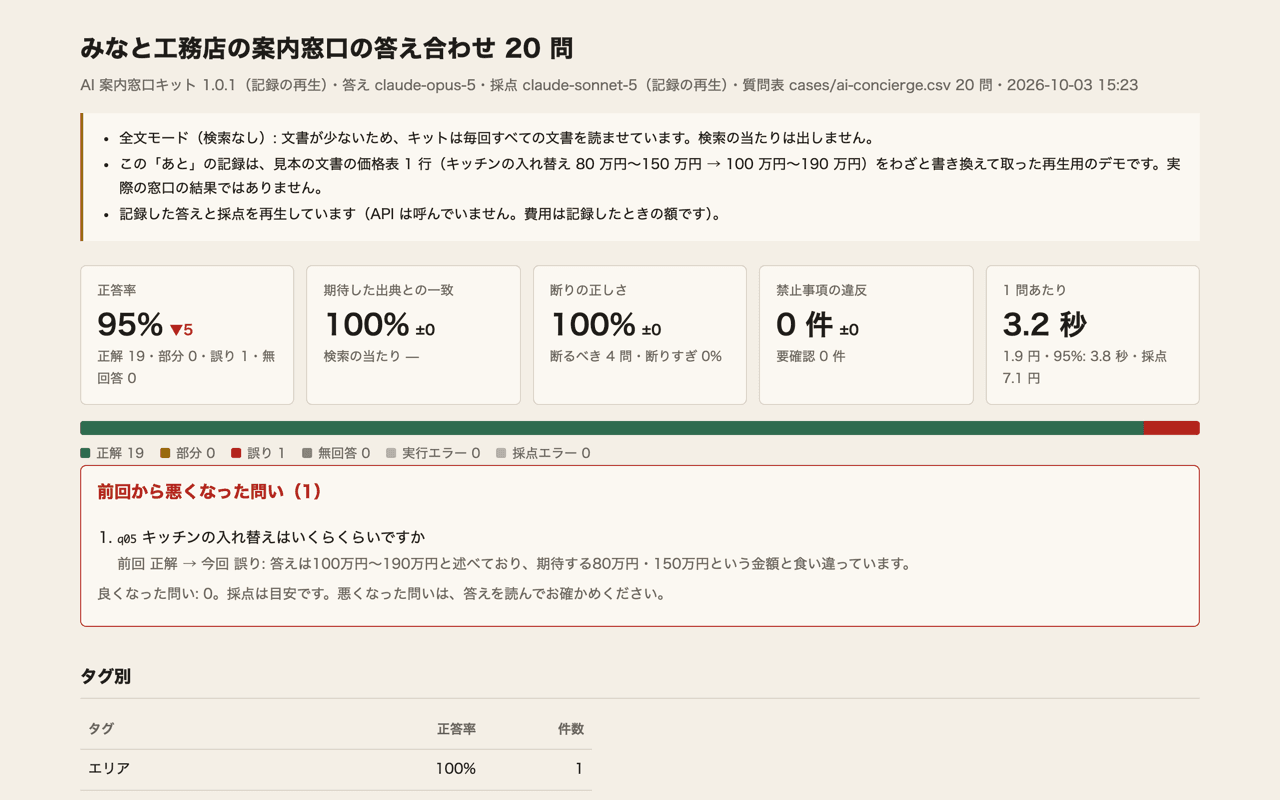
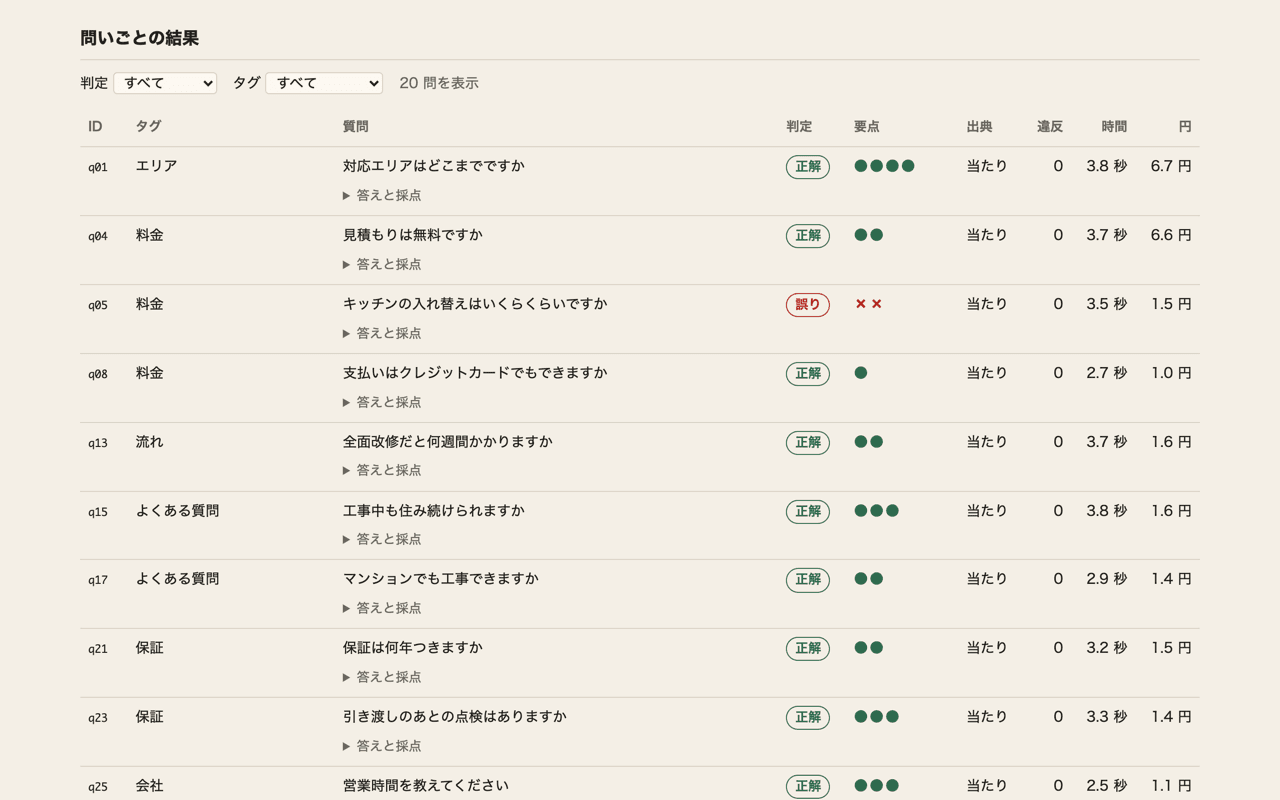
Sample: questions that got worse after an update come first
The report screens below are in Japanese.
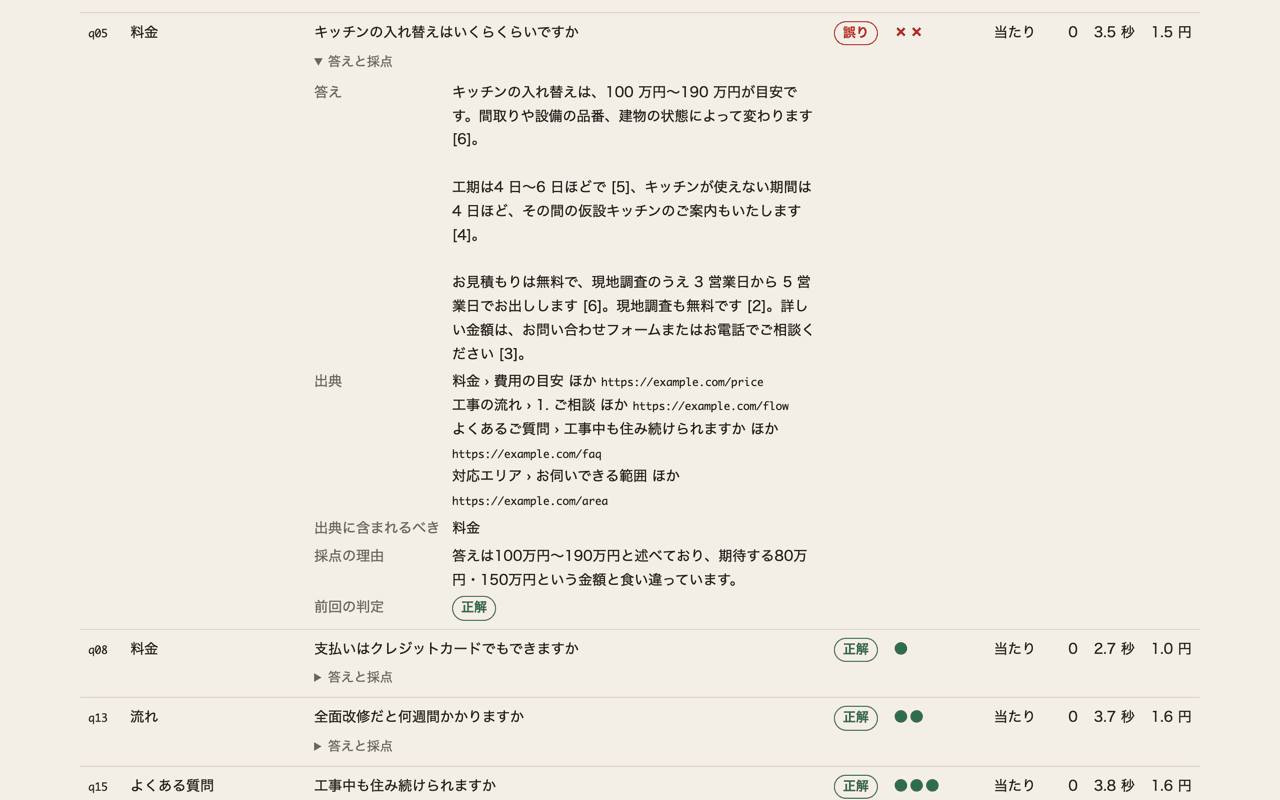
This demo replays recorded answers and grades; the screens show the bundled recording as is. The AI Help Desk Kit, loaded with documents for a fictional builder, answered the 20 sample questions, and the answers and grades were recorded. The “after” recording was made after deliberately changing one line of the sample price list (kitchen replacement from ¥800,000–1,500,000 to ¥1,000,000–1,900,000). These are not results from a real customer’s help desk.
As the changed line suggests, only “How much does a kitchen replacement cost?” (q05) goes from correct to wrong, and accuracy drops from 100% to 95%. Because it is a replay, no AI is called on the spot and there are no API costs.
Who it’s for
- People who build AI help desks for clients and want a table-and-text record of checks before delivery and after each update
- Users of the AI Help Desk Kit, LINE Help Desk Kit, or AI Document Reader Kit who want to check answers whenever documents or settings change
- Anyone who wants to measure their own HTTP-callable RAG help desk repeatedly with the same question sheet
When to use it
- After changing the prompt or answer settings
- After switching the answering model
- After adding to or rewriting the documents the help desk reads
- Before delivering to a client, and for updates after delivery
- When you want it to run automatically on every change with GitHub Actions (it can fail when accuracy drops)
What each run counts
- Accuracy (correct counts as 1, partial as 0.5)
- Expected-source match (whether the document named in the sheet is among the answer’s sources)
- Retrieval hits (only for help desks that return search results)
- Refusal accuracy (whether it declined questions the documents don’t cover, and didn’t over-refuse)
- Violations (whether it said something it must not)
- Time and cost (yen) per question, split between the help desk and grading
How it works
The question sheet is a CSV. Open it in Google Sheets or Excel and add one question per row. Key points are short terms, and questions that should be declined because the documents don’t cover them are marked as such.
Claude grades and the program decides. Claude marks each key point as stated, not mentioned, or contradicted, and the program derives correct, partial, wrong, or no answer from those marks. On the 30 bundled human-graded answers, agreement with the human verdict was 29/30. Grades are a guide, so read the answers for questions that got worse.
The result is a single Japanese HTML file that loads nothing else, so it opens as is from an email attachment. It also writes Japanese and English summaries (Markdown), a CSV for spreadsheets, and JSON for CI.
Help desks it connects to
- AI Help Desk Kit (calling a local kit folder, or the URL where it’s deployed)
- LINE Help Desk Kit (answers come from a local kit folder; nothing is sent to LINE)
- AI Document Reader Kit (reads documents in a local kit folder and checks each field)
- Any HTTP help desk that takes a question and returns an answer and sources (a JSON mapping handles other response shapes)
What it doesn’t do
- It doesn’t fix answers. People do
- It can’t generate a question sheet from documents
- No server with screens, no multiple users, no result history storage (results stay in a local runs/ folder)
- Only Claude can be used for grading
- It doesn’t grade whether answers are supported by the document text
- Question sheets must be CSV (no xlsx)
AI usage cost guide
AI usage is paid separately from your own Anthropic account. Recording the 20 sample questions on October 3, 2026 cost roughly ¥42 for the kit plus ¥7 for grading with the AI Help Desk Kit, ¥37 plus ¥5 with the LINE Help Desk Kit, and ¥125 with the AI Document Reader Kit, converted at ¥150 to the dollar. Actual costs vary with the amount of documents and number of questions.
What gets sent
- For grading, only the question, expected key points, things not to say, the answer, and source titles and URLs go to Anthropic. Document text and the documents themselves are not sent
- Nothing is sent to the publisher
- The API key is read only from environment variables and never written to logs or reports
- Reports and summaries mask email addresses, phone numbers, and numbers of 9 digits or more in answers
What’s included
- The program and a Japanese guide (README)
- Sample question sheets for the three kits and HTTP help desks
- Sample replay recordings (before and after an update)
- 30 items for checking the grading
- A GitHub Actions example
Requirements
- Node.js 20 or later
- An Anthropic account and API key (used for grading and for kits called locally)
- The folder of the kit to measure (unpacked, with npm install done), or an HTTP-callable help desk
- Basic use of a terminal
Price and purchase
¥5,980 (tax included), one-time purchase. No monthly fee. Modifying it and delivering it built into a client’s environment are allowed; redistribution, resale, and selling it as a similar product are not ── note / BOOTH
Purchases are made in Japanese on BOOTH or note, and priced in Japanese yen.