Turn payslips into PDFs and deliver each one only to its employee
Payslip Delivery Kit
Paste the payroll list from your payroll advisor or payroll software into Google Sheets, and the kit creates a PDF payslip for each employee and delivers it only to that person’s email address. Before sending, it checks recipients and amounts, and you send a test to yourself first. It does not calculate tax or social insurance.
The kit’s sheets, payslips and the screens below are in Japanese.
Each month
Press the five menu buttons from top to bottom.
- Paste the advisor’s list into the paste sheet
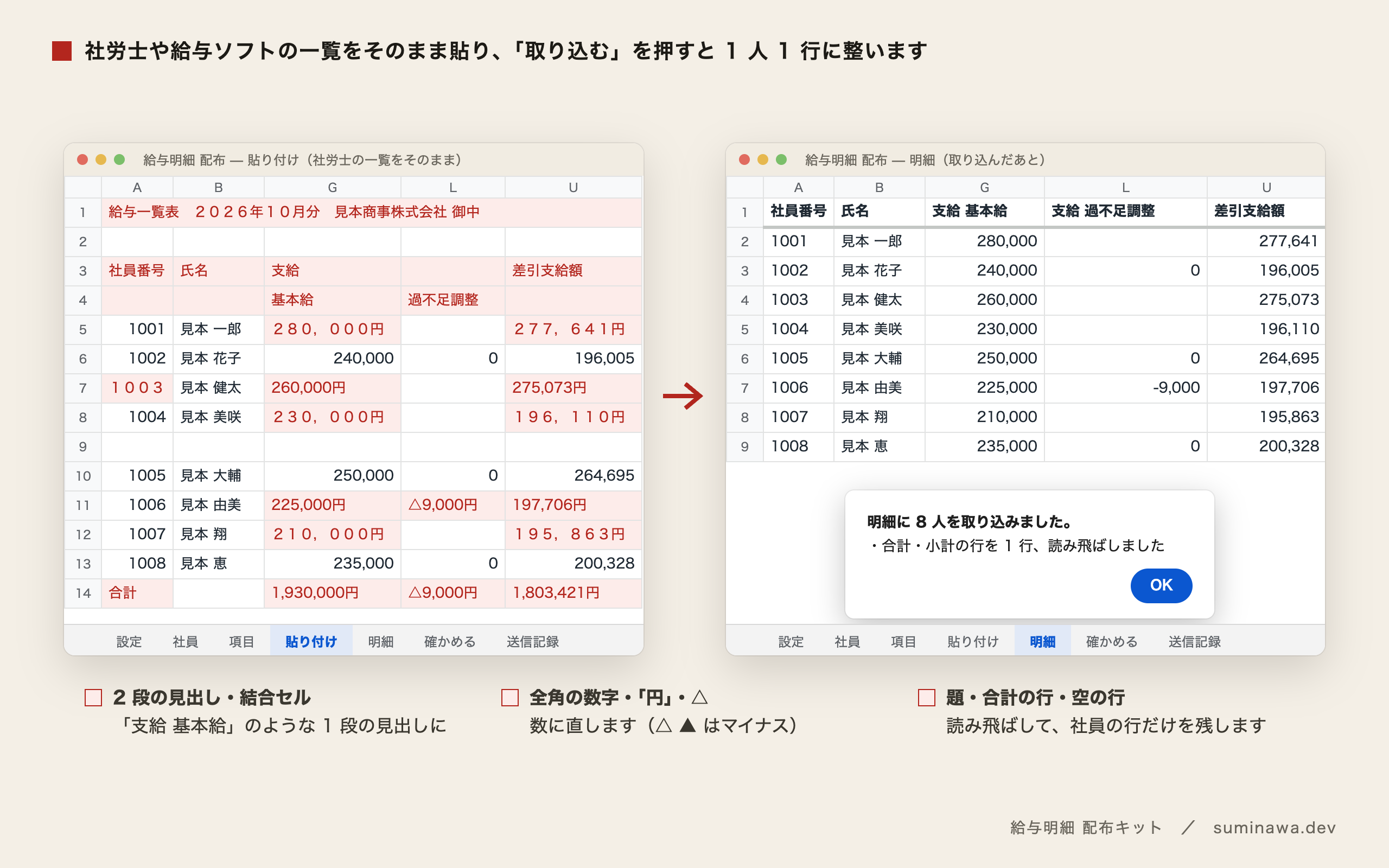
- Press Import (it becomes one row per employee)
- Press Check (11 points before sending)
- Press Test send (links to everyone’s PDFs arrive in one email to you)
- Press Deliver (it confirms the number of people before sending)
Lists from payroll advisors often have two-row merged headers, a totals row at the bottom, and amounts written in full-width characters with a yen mark. The kit reads them as pasted. “△” and “▲” are treated as minus signs, and each header is sorted into attendance, pay, deductions, or totals from its wording. Categories you correct are kept for the following months.
Four stages against sending to the wrong person
What you most want to avoid with payslips is one reaching someone else. So there are four stages before anything is sent.
- Check: 11 points, with counts and how to fix them — employee numbers and names against the roster, email format, the same address for two people (addresses with + such as taro+pay@ count as the same inbox), net pay, employees who have left, and how the spreadsheet is shared.
- Test send: PDFs are created for everyone and a single email goes to you. Deliver cannot be pressed for that month until the test send is done.
- Head count: Deliver shows how many people will receive it (shared or attached) and how many get paper, and sends only after you press Yes.
- No duplicates, and a log: the same month and title is never sent twice to the same person. When, to whom, to which address, and how it was sent are all recorded.
What employees see
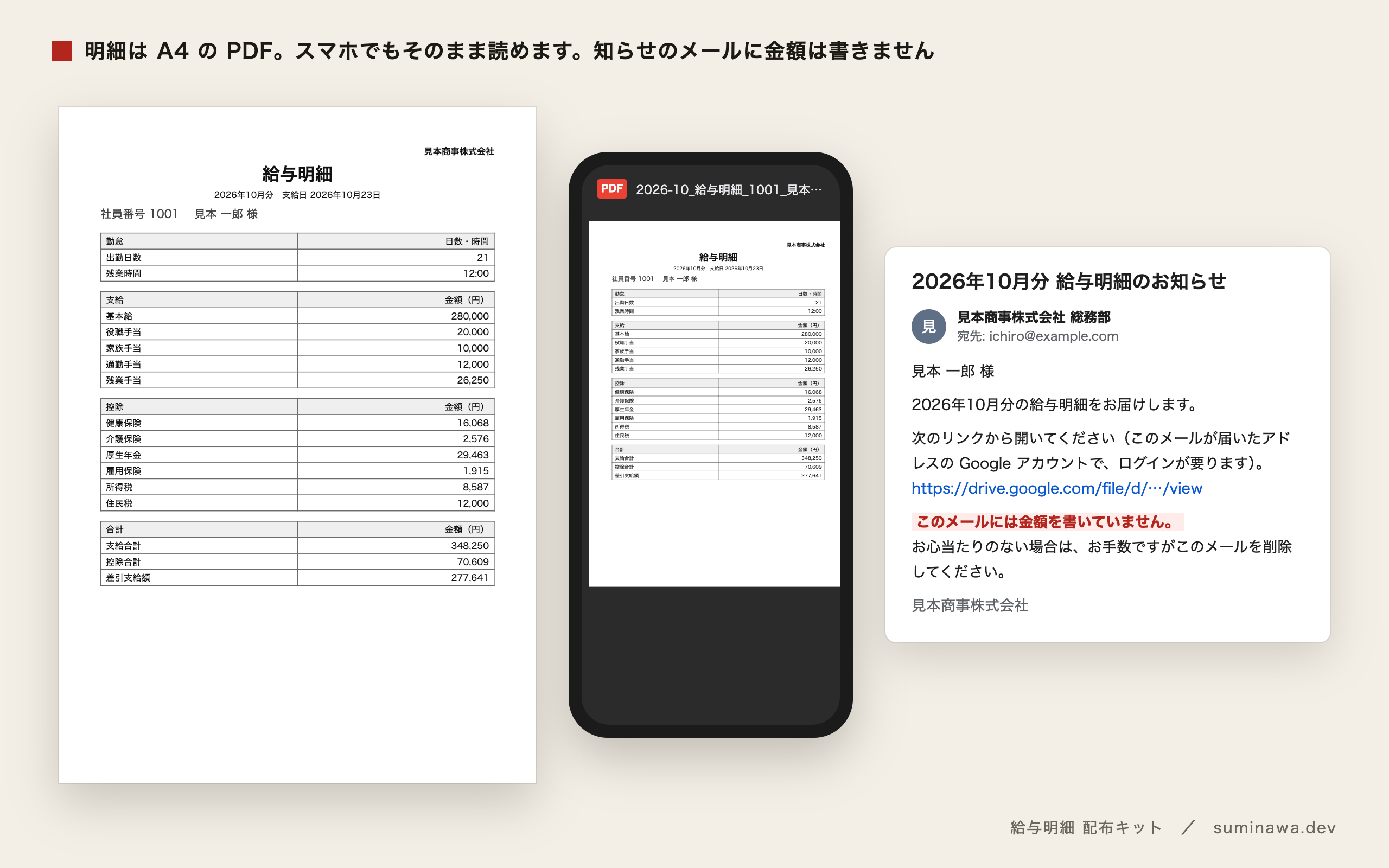
Each payslip is an A4 PDF. By default the PDF is placed in Drive, shared so that only the employee’s Google account can open it, and the link is sent by email. A forwarded link opens for no one else. The email never contains amounts. Employees who cannot open shared files can receive the PDF as an attachment instead. It opens in a smartphone browser too.
In Japan, giving payslips electronically requires the recipient’s prior consent (Income Tax Act, Article 231(2), among others). The roster has a consent-date column; people with no consent date are not emailed and are listed as receiving paper. A sample consent request is included. It is one example of the procedure — please consult your tax accountant or payroll advisor on how to obtain consent.
- 11 checksPoints the Check step reviews before sending: employee numbers against names, addresses that reach the same inbox, sharing settings and more. If any needs attention, nothing can be sent.
- 132 testsTests covering import, checks, duplicate prevention and the full flow against a simulated Apps Script environment. All pass.
- ~2 minTime to create PDFs for the eight sample employees and send the test to yourself (about 10–15 seconds per PDF).
- ¥0Monthly fee. It runs on Google Sheets and Apps Script only, and sends nothing to the author’s servers or anywhere else.
Who it’s for, and who it isn’t
A good fit if you
- Have payroll calculated by an advisor or in Excel, and only hand out payslips on paper (roughly 5–30 employees)
- Use Google Workspace or Gmail
- Want to deliver payslips electronically without a web payslip service’s monthly or setup fees
- Are a payroll advisor helping clients deliver payslips (see the advisor / agency license)
Not the right fit if you
- Already use payroll software with web payslips, such as freee HR or Money Forward Cloud Payroll (that is enough)
- Want payroll, tax, or social insurance calculated (it doesn’t calculate; it lays out an already-calculated list as payslips)
- Want to use Excel only (it uses Google Sheets and Google Drive)
- Deliver to more than 150 people in one company
Compared with other options
| Type | Name | Cost | What it does / how it differs |
|---|---|---|---|
| Payroll software | Web payslips in freee HR, etc. | Included in the payroll software subscription | One tool from payroll calculation to delivery. If you already use payroll software, that is enough. |
| Similar service | Web payslip services such as i-Compass and Web Kyukincho Cloud | About ¥40–220 per person per month; some charge a setup fee | Employee login screens and long-term payslip storage are handled for you. For 10 people, about ¥5,000–26,000 a year. |
| Free tool | Excel mail merge, free payslip templates | ¥0 | You can lay out payslips. Delivery is printing, or emailing each person by hand, checking recipients by eye. |
| This kit | Payslip Delivery Kit | ¥3,480(tax included, one-time purchase) | Imports the advisor’s list as is and shares each payslip only with its employee’s address. Pre-send checks, test send, duplicate prevention, a send log, and consent dates, all in one spreadsheet. |
If a free tool covers your needs, we recommend using it.
Features and costs of the other options were checked on each vendor’s site on Oct 23, 2026.
Price
- Kit only (you install it)
- ¥3,480(tax included, one-time purchase) Buy on BOOTH
- Payroll advisor / agency
- ¥9,800(tax included, one-time purchase)Install it in your clients’ spreadsheets and hand it over, with no limit on the number of clients. Choose it on the same BOOTH page
- Setup done for you
- From ¥36,480 in total (tax incl.)Kit ¥3,480 + setup from ¥33,000 (¥30,000 before tax)Request setup (contact page)
- Free version
- ¥0 Get the free version (BOOTH)
Receipts and invoices
We are not a registered qualified invoice issuer under Japan’s invoice system, so BOOTH does not issue a receipt for this shop (BOOTH issues receipts only for registered issuers). For your records, use BOOTH’s order confirmation email and your payment statement (for example, your card statement). The purchase does not qualify for a consumption tax input credit.
Where people usually get stuck
First setup (about 20 minutes)
Do these four things once. No programming knowledge is needed.
- Create a new spreadsheet and paste the included Code.gs and appsscript.json into Apps Script.
- Press Payslips → Initialize in the menu and allow access on Google’s screen. Since you pasted the script yourself, a “Google hasn’t verified this app” screen is expected.
- On the employees sheet, enter employee number, name, email, delivery method, and consent date, one person per row.
- On the settings sheet, enter company name, target month, and pay date.
Each month it’s five steps: paste the list, Import, Check, Test send, Deliver — about 5–10 minutes for 10 employees. You can try the flow first with the included sample data (eight employees of a fictional company, three months).
When an employee can’t open their payslip
Shared payslips open only with the Google account of the address the email went to. Check in this order.
- Is the employee signed in with the Google account for that address (not switched to another work or personal account)?
- Did you hand out the included guide for recipients (how to open it on a computer and a smartphone)?
- If it still won’t open, set that person’s delivery method to attachment on the employees sheet and resend to them only.
People whose address can’t receive a share, such as one without a Google account, are switched to attachment automatically when you deliver. If the authorization screen says your administrator has restricted it, ask your Google Workspace administrator to allow the script.
Try it, or have it done
Before buying, you can check that your own payroll list imports. A free version, “給与明細 配布キット 無料版”, handles up to three employees and goes as far as a test send to yourself. It imports the same way as the paid version, and it’s on BOOTH (the page is in Japanese).
We can also install it in your spreadsheet. The price is shown as “Setup done for you” under Price above.
You can also order it on Coconala: “給与明細をPDFで本人だけに配る仕組みを設定します” (kit included, ¥15,000; the page is in Japanese). We set the items and wording to fit your payroll list and send setup instructions.
If you’re not sure your list will import, send the header rows and the first one or two rows to hello@suminawa.dev, free of charge. Please delete or mask names, amounts, and email addresses before sending.
Payslip Delivery Kit ── note / BOOTH
Purchases are made in Japanese on BOOTH or note, and priced in Japanese yen.
For 14 days after purchase, if it does not work by following the guide, we will work through the setup with you by email. As these are digital products, returns and refunds are not accepted.